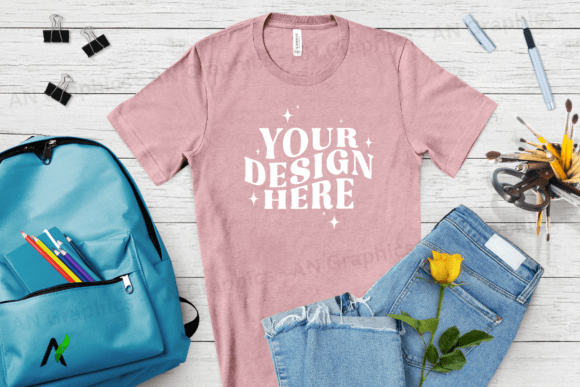
Back to School Bella Canvas Mockup - 069
Designing t-shirts has never been easier with the Back to School Bella Canvas Mockup - 069. This high-resolution JPEG mockup is designed to help creators, marketers, and small business owners showcase their designs with professional quality. Whether you're creating custom apparel for a school event, a branding campaign, or a personal project, this mockup offers a versatile and user-friendly solution.
What Makes the Back to School Bella Canvas Mockup - 069 Unique?
The Back to School Bella Canvas Mockup - 069 is a flat, high-resolution image at 3750 x 3000 pixels, making it ideal for detailed design work. It's available in 300 dpi, ensuring crisp clarity for both print and digital use. Unlike some complex mockups that require advanced editing tools, this one is simple to use. You can easily layer your design or text on top of the blank shirt without worrying about smart objects or complicated layers.
With no logos, watermarks, or brand elements, the mockup is completely customizable. This means you have full creative freedom to experiment with different styles, colors, and layouts. The clean, blank canvas makes it easy to focus on your design without distractions.
Creative Possibilities with the Back to School Bella Canvas Mockup - 069
This mockup opens up a world of creative possibilities. Here are a few ideas to get you started:
- School Themes: Create back-to-school themed t-shirts featuring motivational quotes, student life illustrations, or campus scenes. These can be used for school events, parent-teacher meetings, or as promotional items for educational institutions.
- Branding Campaigns: Use the mockup to develop branded t-shirts for marketing campaigns. Add your logo, tagline, or key messaging to create a cohesive visual identity for your business or organization.
- Personal Projects: For hobbyists and indie designers, this mockup is perfect for experimenting with new design techniques or testing out new color schemes. It’s an excellent tool for building a portfolio or showcasing your creative process.
- Collaborative Workshops: Educators and workshop facilitators can use this mockup to teach students about graphic design, typography, and branding. It’s a hands-on way to engage learners and encourage creativity.
How to Use the Back to School Bella Canvas Mockup - 069 Effectively
Whether you're using Adobe Photoshop or Canva, the process is straightforward. Simply download the mockup, open it in your preferred editing software, and place your design on top of the shirt. You can adjust the position, size, and opacity of your design to achieve the desired effect.
To maintain consistency across multiple designs, consider creating a style guide or template. This helps ensure that all your t-shirt designs look cohesive and professional. Also, always test your designs on different backgrounds to see how they appear in various contexts.
Adapting the Mockup for Different Goals and Audiences
The beauty of the Back to School Bella Canvas Mockup - 069 lies in its adaptability. Here are some ways to tailor it for different purposes:
- For Entrepreneurs: Use the mockup to create custom t-shirts for your online store or local market. Offer unique designs that resonate with your target audience and reflect your brand values.
- For Bloggers: Incorporate the mockup into your content by showcasing your favorite designs or sharing tips on how to use mockups effectively in your creative workflow.
- For Educators: Integrate the mockup into lesson plans or classroom activities to teach design principles, color theory, and layout techniques in a fun and interactive way.
- For Freelancers: Use the mockup to present your work to clients in a polished format. It adds professionalism and demonstrates your attention to detail.
Practical Tips for Using the Back to School Bella Canvas Mockup - 069
To make the most of this mockup, follow these practical tips:
- Experiment with Colors: Try different color combinations to see which ones work best for your design. The Heather Raspberry option provides a soft, elegant base that complements a wide range of styles.
- Focus on Typography: Since the mockup is blank, pay close attention to how your text appears. Ensure that fonts are readable and visually appealing.
- Use High-Quality Images: Always use high-resolution images for your designs to maintain clarity and sharpness when printed or displayed digitally.
- Keep It Simple: Avoid overcomplicating your design. A clean, minimalist approach often looks more professional and is easier to understand.
Conclusion
The Back to School Bella Canvas Mockup - 069 is more than just a tool—it’s a gateway to creative expression. Whether you're a seasoned designer or just starting out, this mockup offers the flexibility and simplicity needed to bring your ideas to life. With its high resolution, ease of use, and versatility, it's an essential resource for anyone looking to elevate their t-shirt designs and make a lasting impression.